What is Invoicing Software?
The Definitive Business Guide
Invoicing software is the digital engine that automates billing, manages client payment cycles, eliminates manual spreadsheet errors, and gets your business paid up to 2x faster.
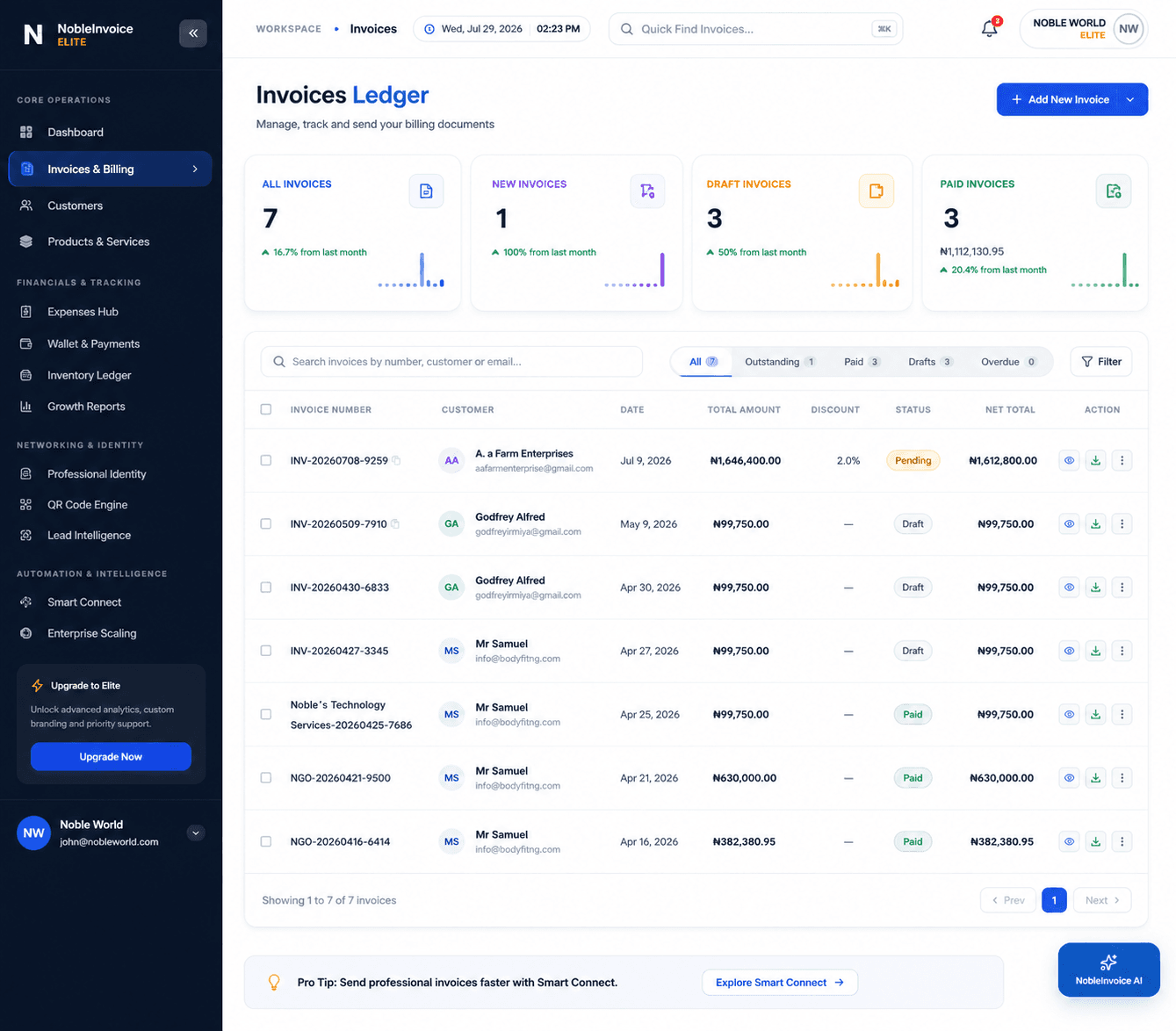
Definition: What is Invoicing Software?
Invoicing software is a dedicated business application that streamlines the complete accounts receivable cycle. It allows freelancers, agencies, and enterprises to draft legally compliant commercial invoices, automatically compute taxes and line-item totals, deliver digital payment links, monitor client open status via telemetry, and schedule automated payment reminders.
Unlike traditional paper bills or Word/Excel templates, cloud-based invoicing software connects billing directly to customer records (CRM), expense ledgers (Expense Management), and instant merchant settlement (Payments).
Invoicing Software vs. Accounting Software vs. Spreadsheets
Understanding which tool is right for your stage of business ensures you avoid overpaying for unnecessary software or drowning in manual admin.
| Feature / Capability | Nobevra Invoicing | Full Accounting Software | Excel / Word Templates |
|---|---|---|---|
| Primary Focus | Getting Paid Fast & Cash Flow | General Ledger & Tax Compliance | Static Document Creation |
| Instant Online Checkout Button | Built-in (Cards, Bank) | Often Requires Add-on Fee | Not possible |
| Live Client Open-Tracking (Telemetry) | Instant Push Notification | Limited or Basic | Blind sending |
| Automated Late Payment Reminders | 100% Automated | Available on higher tiers | Manual chasing |
| Ease of Use / Setup Time | Under 60 Seconds | Days to weeks of configuration | Manual formatting each time |
| Integrated Client CRM Vault | Included | Separate CRM module | None |
| Average Monthly Cost | Free to Low Flat Fee | – + / month | Free (High Time Cost) |
5 Essential Capabilities of Modern Invoicing Software
When evaluating invoicing software for your business, ensure it provides these core automation workflows:
1. Template Customization
Choose from dozens of professional layouts, upload your brand logo, set custom primary palette colors, and display regulatory tax IDs (VAT, EIN, GST).
Explore Invoicing Features2. Instant Payment Gateway
Enable clients to settle invoices directly on the digital invoice page via debit/credit card, bank transfer, or mobile money in 30+ international currencies.
View Payment Processing3. Automated Chasing
Eliminate awkward follow-ups. Pre-schedule automated, polite email notifications that fire 3 days before the due date, on the due date, and at intervals post-due.
See Automation Suite4. Connected CRM Vault
Maintain client contact cards, historical transaction records, lifetime revenue figures, and outstanding balances in a unified customer database.
Explore CRM Engine5. Real-Time Telemetry
Receive instant notifications when your customer receives, opens, views, or downloads an invoice, giving you full visibility into payment progress.
AI Telemetry InsightsReady to modernize your billing?
Join thousands of businesses accelerating cash flow with Nobevra.
How Much Does Manual Invoicing Cost You?
Calculate your administrative drag and see the direct financial return of switching to automated billing.
Volume of documents generated
Minutes spent per invoice
Your time's billable rate
Total Monthly Savings
$0
Time Recaptured
0h/mo
Efficiency Boost
80%
Questions About Invoicing Software Answered
Clear answers to the most common questions about selecting and implementing billing tools.
What is invoicing software and how does it work?
Invoicing software is a digital platform that generates, sends, tracks, and collects commercial invoices online. You select a client from your database, input services or goods with set prices and taxes, and the software generates a formatted PDF with embedded payment links. It automatically notifies you when the client opens the document and records payment upon settlement.
How is invoicing software different from accounting software?
Invoicing software focuses strictly on the customer billing cycle (accounts receivable): creating invoices, collecting payments, and managing client relationships. Accounting software is a much larger system for double-entry bookkeeping, general ledgers, tax filing, and payroll. Most small businesses only need invoicing software to run daily operations smoothly.
Can I create an invoice online for free?
Yes. You can use Nobevra's Free Invoice Generator to design, calculate taxes for, and download high-resolution PDF invoices instantly without creating an account.
What should be included on a professional commercial invoice?
A valid invoice must include your business name and contact info, client billing details, a unique sequential invoice number, issue date and due date, an itemized table of products/services with unit prices and tax rates, the total balance due, and accepted payment instructions. Learn more in our Step-by-Step Invoice Creation Guide.
How do automated payment reminders work?
Once configured, Nobevra's automated reminder system sends polite email alerts to clients at pre-set milestones (e.g., 3 days before due date, on the due date, and 7 days overdue). As soon as the client settles via the online payment link, the system immediately ceases reminder emails.
Automate your billing workflow today.
Stop losing hours to spreadsheet formatting and manual payment follow-ups. Experience the speed of intelligent business operating software.